Share your bank details

You can do this in our app

  • Easily share your bank details with friends and family.
  • Share your bank details directly from our Mobile Banking app to your contacts.
  • Send from any messaging apps you have installed on your phone such as WhatsApp or iMessage.

Keep your details safe. Only send them to people you know.
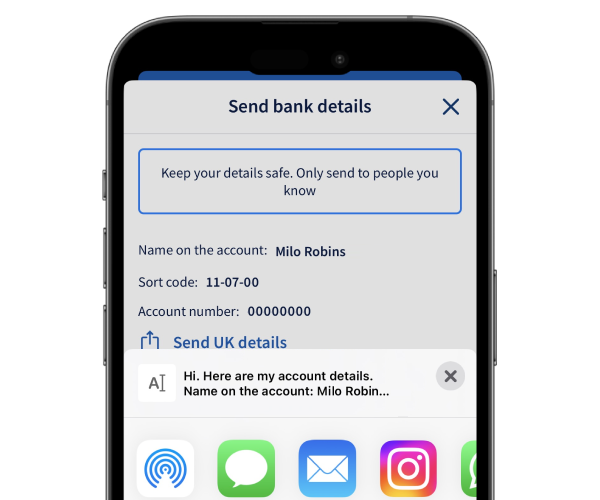
Share bank details

How to do it

Let us show you step by step.

    1. Sign in to our app and select the More option from your account.
    2. Then choose Send bank details.
    3. If your recipient lives in the UK, select Send UK details. If your recipient doesn’t live in the UK, select Send international details.
    4. From the list, choose the preferred messaging app you want to use to send your banking details. 
    5. Select who you want to send the details to from your list of contacts.
    6. All done - you’ve shared your account details.

Is it safe to share your bank details?

Sharing your account number and sort code is normally fine. But if someone messages you out of nowhere, don’t hand over your details. Scammers send texts and emails to try to get your bank details.
Learn about scam messages

Get set up online


The Halifax brand is changing to Lloyds

If you don’t currently use online or mobile banking, you can start using the Lloyds app now to see your existing Halifax accounts. Once you’ve downloaded it, you can set it up using your Halifax account details.

How to get online

More on the change

You might also like

Pay in a cheque

Did you know that you can pay in cheques of up to £10,000 each, or a total of £10,000 a day in our app?

Online cheque deposits

App notifications

Opt-in to notifications about payments, weekly spend summaries or updates as you use your card.

More about app notifications

Staying safe online

We use up-to-date security systems to help you keep your money safe when you bank online.

How we protect you

More help with payments

Track down regular payments, share your bank details or pay in a cheque on your phone.

See our guides

More help with payments

Track down regular payments, share your bank details or pay in a cheque on your phone.

See our guides