Transfer money between your accounts

You can do this online

  • Move money between your Lloyds, Bank of Scotland and Halifax accounts using online banking or in the app.
  • Transfers are instant.
  • You can transfer as much as you want and as often as you want.
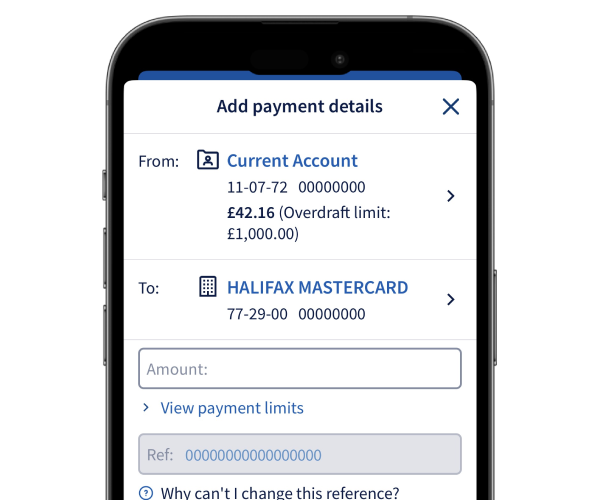
Transfer between accounts image

How to do it

Let us show you step by step.

Watch our video guide

(1 min 13 secs)

    1. Sign in and select Payments from your account.
    2. Select Choose who to pay. Then select the account you want to transfer to.
    3. Enter the amount. Then select Continue.
    4. Check the details. Then select Confirm to make the transfer.
    5. You’ll see a message to confirm that your transfer has taken place.
    1. Sign in and select Make a quick transfer from the top of your account page.
    2. Enter the amount you want to transfer.
    3. Select the account you want to transfer money from. Then choose where to send the money.
    4. Check the details. Then select Transfer.
    5. You’ll see a message to confirm that your transfer has taken place.

Get set up online


The Halifax brand is changing to Lloyds

If you don’t currently use online or mobile banking, you can start using the Lloyds app now to see your existing Halifax accounts. Once you’ve downloaded it, you can set it up using your Halifax account details.

How to get online

More on the change

You might also like

Do more with the app

Find out about all the great features of our highly rated app, and how it compares to online banking.

More about the app

Message us online

Get answers to your everyday banking questions. Log in to our app or online banking to get in touch.

How to message us

Online statements

Search transactions, see upcoming payments, find out where payments were made and so much more.

More about statements

More help with payments

Track down regular payments, share your bank details or pay in a cheque on your phone.

See our guides

More help with payments

Track down regular payments, share your bank details or pay in a cheque on your phone.

See our guides