Update your marketing choices

You can do this online

  • See relevant messages when you sign in to our app and Online Banking.
  • If you change your mind, you can update your choices at any time.
  • Whatever you choose, you will still receive statements and information about changes to your existing products and services.
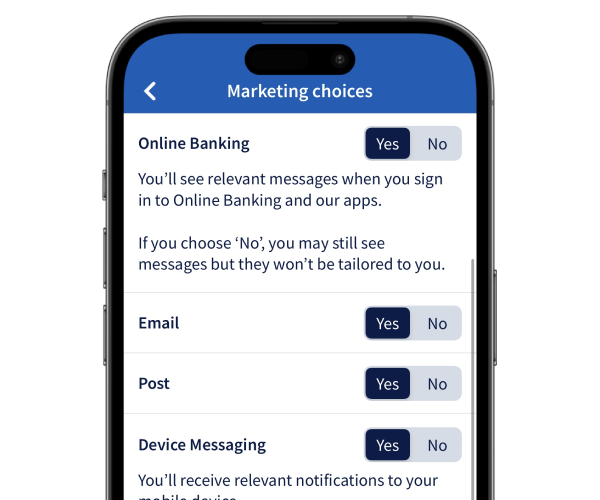
Marketing choices image

How to do it

Let us show you step by step.

    1. Sign in and select the Profile and settings icon in the top right corner.
    2. Choose the Settings tab and select Marketing choices.
    3. Toggle Yes or No to select which of the products and offers may be of interest to you. Then press Confirm.
    4. All done. You've updated your marketing choices.
    1. Sign in and select Your profile in the navigation bar at the top of the page.
    2. Select Change your marketing preferences, under Your Internet banking details.
    3. Toggle Yes or No to select which of the products and offers may be of interest to you. Then press Submit.
    4. All done. You've updated your marketing choices.

Get set up online


The Halifax brand is changing to Lloyds

If you don’t currently use online or mobile banking, you can start using the Lloyds app now to see your existing Halifax accounts. Once you’ve downloaded it, you can set it up using your Halifax account details.

How to get online

More on the change

Let’s take a closer look

You might also like

App notifications

Opt-in to notifications about payments, weekly spend summaries or updates as you use your card.

More about app notifications

Do more with the app

Find out about all the great features of our highly rated app, and how it compares to online banking.

More about the app

Message us online

Get answers to your everyday banking questions. Log in to our app or online banking to get in touch.

How to message us

More help with your profile or settings

Update your personal details, manage app notifications or activate Offers.

See our guides

More help with your profile or settings

Update your personal details, manage app notifications or activate Offers.

See our guides